“YORU” is open-source software for animal behavior detection using object detection. YORU classifies animal behaviors as "behavior objects."
Support the development of YORU.
Sponsor©Copyright 2026 Hayato M. Yamanouchi
Edit a condition YAML file.
From v1.1.2, the launcher also has a Create new config → button under Real-time Process. It opens a tool that builds a condition file interactively.
name: fly_copulation_project   # Experimental name.
export: /Path/to/result/directory/   # Output folder for videos and experiment information.
export_name: fly_copulation_real_time_analysis   # Specifying the file name of the output video.

model:
  yolo_detection: False   # If you want to start YORU's inference immediately after starting YORU's real-time process, set this to True.
  yolo_model_path: Path/to/YORU/model   # Specify the YORU model (.pt file).
  yolo_model_type: auto   # New in v1.1.2. "auto", "yolov5", "yolov8", "yolo11", "rtdetr", "fasterrcnn", "maskrcnn" or "ssd".
  Trigger: False

capture_style:
  stream_MSS: False   # When using the screen capture function, set to True.

trigger:
  trigger_threshold_configuration: 0.3   # Confidence threshold when detecting YORU. Not applied in v1.1.x (see below).
  trigger_class: copulation   # Which action class to trigger.

  Arduino_COM: "COM3"   # COM to which Arduino is connected. Use straight quotes.
  trigger_pin: 13   # Specifying pin numbers for outputting TTL signals with Arduino. Not applied in v1.1.x (see below).
  trigger_style: standard_arduino   # Select which trigger plugin to use.

hardware:
  use_camera: True   # Specify whether to use the camera.
  camera_id: 0   # Specifying the camera ID.
  camera_width: 640   # Specify the width (px) of images captured by the camera.
  camera_height: 480   # Specifying the height (px) of images captured by the camera.
  camera_scale: 1   # If you want to change the scale of the camera image, change this setting.
  camera_fps: 30   # Specifying camera fps.
  camera_imshow: False   # When set to True, the opencv window opens.
Use straight quotes (
"COM3"), not curly quotes (“COM3”). Thetemplate.yamlshipped with v1.1.2 still contains curly quotes aroundCOM3, so correct them when you copy it.
yolo_model_typeis optional. Leave it asautounless the model type cannot be recognised from the file name.
⚠️ Two trigger settings are not applied in v1.1.x. The TTL signal always comes out of Arduino digital pin 13, whatever
trigger_pinsays.trigger_threshold_configurationis loaded but not used, so the trigger fires on any detection oftrigger_classthat the model reports. Wire the output to pin 13. Both settings are applied in the v2.0 beta.
Select the condition YAML file in YORU start page.
Run “Real-time Process”.
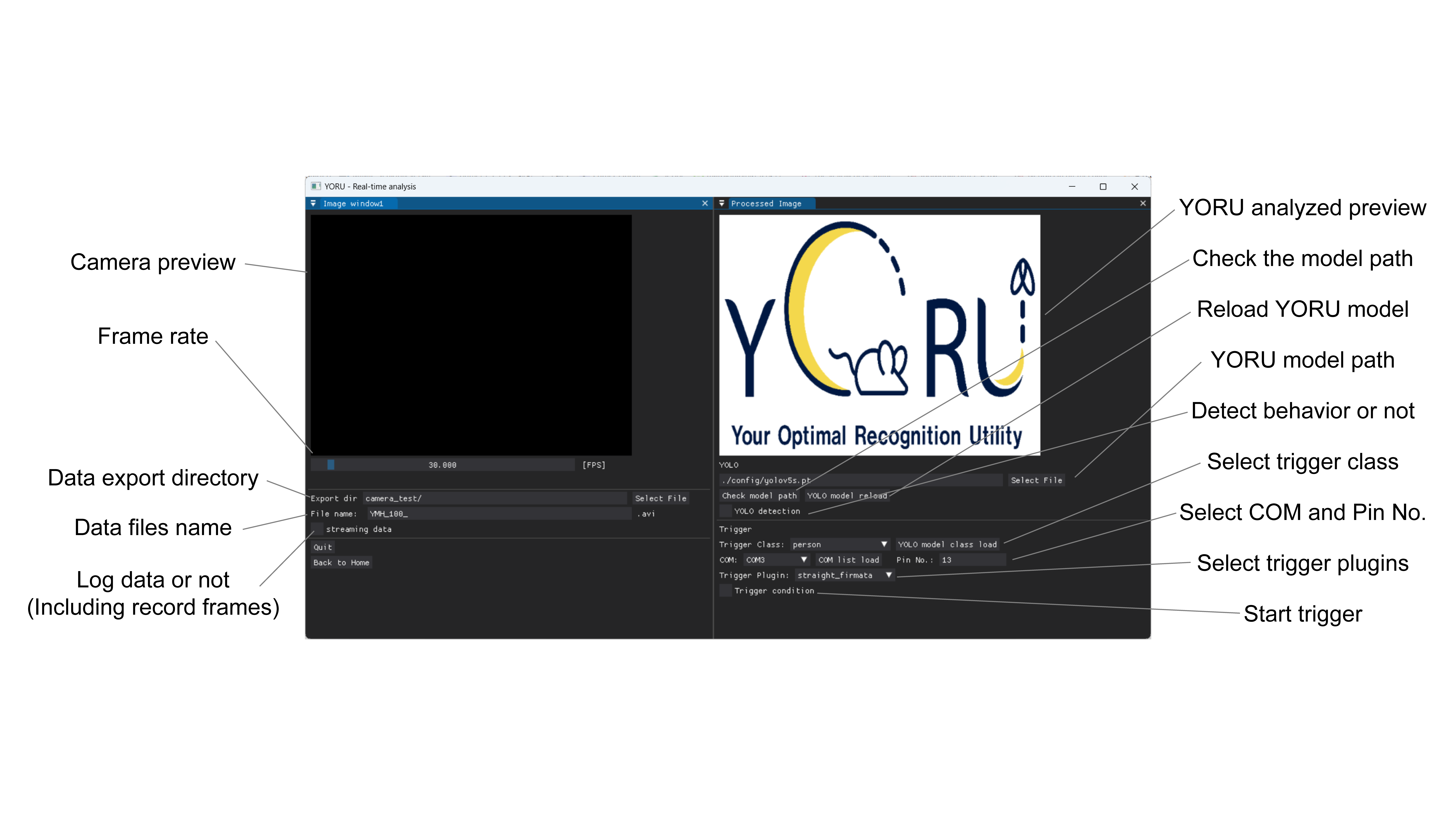
Operate Real-time Process GUI.