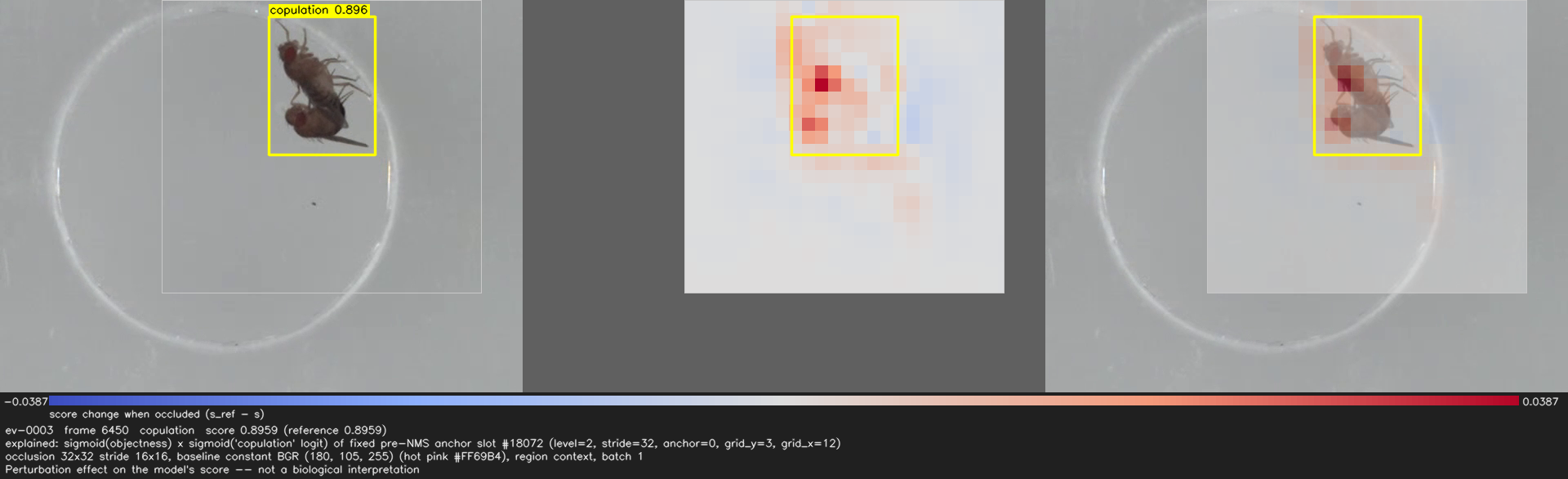
Which parts of the frame does the detector's score for this detection depend on, and by how much?
YORU-Explain
YORU-Explain is a sister application of YORU, like YORU-Tracker: its own window, its own command, YORU unchanged. It loads a model of any of YORU’s detection backends the way YORU runs it, checks that it detects exactly what YORU detects, lets you pick one detection on a video frame, and measures
- Occlusion sensitivity — the change in that detection’s score when a region of the frame is replaced by a baseline (a perturbation effect);
- Grad-CAM — a gradient-weighted feature map of that score (an attribution), offered only for models whose gradient path was verified.
One model's score — not biology
Both methods are about one model’s score for one detection. Neither is evidence of what the animal does or which body part matters biologically; a map that does not highlight the wing is a measurement, not a failure. See Reading the results.
Part of the YORU family
The three applications are installed side by side in one folder and look like siblings: each window is YORU’s navy DearPyGui theme with its own accent — YORU blue, YORU-Tracker’s teal, YORU-Explain’s hot pink. YORU never imports YORU-Explain; YORU-Explain runs YORU’s detectors through YORU’s own code and checks itself against them.
| YORU | YORU-Tracker | YORU-Explain | |
|---|---|---|---|
| Purpose | detection, closed loop | identity, trajectories | why a detection scores as it does |
| Launch | python -m yoru |
python -m yoru_tracker |
python -m yoru_explain |
| GUI | DearPyGui | DearPyGui | DearPyGui |
| Accent | YORU blue | teal | hot pink |
Versions
| Version | Notes | |
|---|---|---|
| YORU-Explain | v0.1.0 | First version, in development; no release has been tagged yet |
| YORU (needed) | 2.0.0b3 or later | A 2.0 version with the YOLOv5 backend (yoru/libs/yolov5); see Install |
Features
Every YORU backend
YOLOv5 (YORU v1 models); YOLOv8, YOLO11, YOLOv5u, YOLOv10 with detect, rotated-box OBB, segmentation and pose; RT-DETR; Faster R-CNN, Mask R-CNN, SSD; ONNX exports. Anything else YORU loads runs as a black box.
Identical to YORU
Each model runs exactly as YORU runs it. By default every run first compares the detections with YORU's own detector, bit for bit, and stops if they differ.
The detection itself
The explained score is that of the pre-NMS candidate the detection came from — never "the best box of the class", which would follow whichever of two flies is stronger.
No score is never zero
A target that disappears, becomes ambiguous or fails gets a named status and no number. Nothing missing is written as 0.
Reproducible runs
Each run folder holds the request, the provenance (versions, GPU, model SHA-256, frame hashes, the identity check) and tables that carry their schema version.
Window and Python
A DearPyGui window like YORU's, which never blocks while a run is going, and a Python API — the same functions the window calls.
Quick install
YORU-Explain needs a YORU checkout next to it, as YORU-Tracker does. With uv:
mkdir YORU-dev
cd YORU-dev
git clone https://github.com/Kamikouchi-lab/YORU.git
git -C YORU checkout yoru-tracker-lite
git clone https://github.com/Kamikouchi-lab/YORU-Explain.git
cd YORU-Explain
uv sync
uv run python -m yoru_explain
uv sync creates .venv with YORU installed (editable) from ../YORU and the CUDA 12.8 build of PyTorch on Windows and Linux. The install guide has the details and the route without a sibling checkout.
Learn about YORU-Explain
- User guide — install, then the five tabs of the window: Project, Explore, Analyze, Statistics, Settings; and the Python API
- How it works — what exactly is measured, occlusion sensitivity, Grad-CAM, and how to read the results
- Reference — supported models, output files, what has been validated
- Q&A and Screenshots
- Development notes — architecture, tests, roadmap
Requirements
OS
- Windows 11 (verified). Other platforms are untested.
Software
- Python 3.10 (uv provides it)
- YORU 2.0.0b3 or later with
yoru/libs/yolov5, checked out next to YORU-Explain
Hardware
- An NVIDIA GPU is optional: everything also runs on the CPU, more slowly. PyTorch is installed as its CUDA 12.8 build, which RTX 50-series cards need.
Development environment
- Windows 11, Python 3.10.22, torch 2.11.0+cu128, ultralytics 8.3.222, torchvision 0.26.0, onnxruntime 1.23.2, DearPyGui 1.11.1
- GPU: NVIDIA GeForce RTX 5060 Ti (results also checked on the CPU)
Reference
- Hayato M. Yamanouchi et al., YORU: Animal behavior detection with object-based approach for real-time closed-loop feedback. Sci. Adv. 12, eadw2109 (2026). DOI:10.1126/sciadv.adw2109
- M. D. Zeiler, R. Fergus, Visualizing and understanding convolutional networks. ECCV (2014) — occlusion sensitivity.
- R. R. Selvaraju et al., Grad-CAM: Visual explanations from deep networks via gradient-based localization. ICCV (2017).
License
AGPL-3.0-or-later. YORU-Explain runs YORU’s AGPL code in process, including the bundled YOLOv5, and ultralytics (AGPL-3.0), torchvision (BSD-3-Clause) and ONNX Runtime (MIT), with which YORU runs its other backends. DearPyGui is MIT.