
“YORU” is open-source software for animal behavior detection using object detection. YORU classifies animal behaviors as "behavior objects."
Support the development of YORU.
Sponsor©Copyright 2026 Hayato M. Yamanouchi






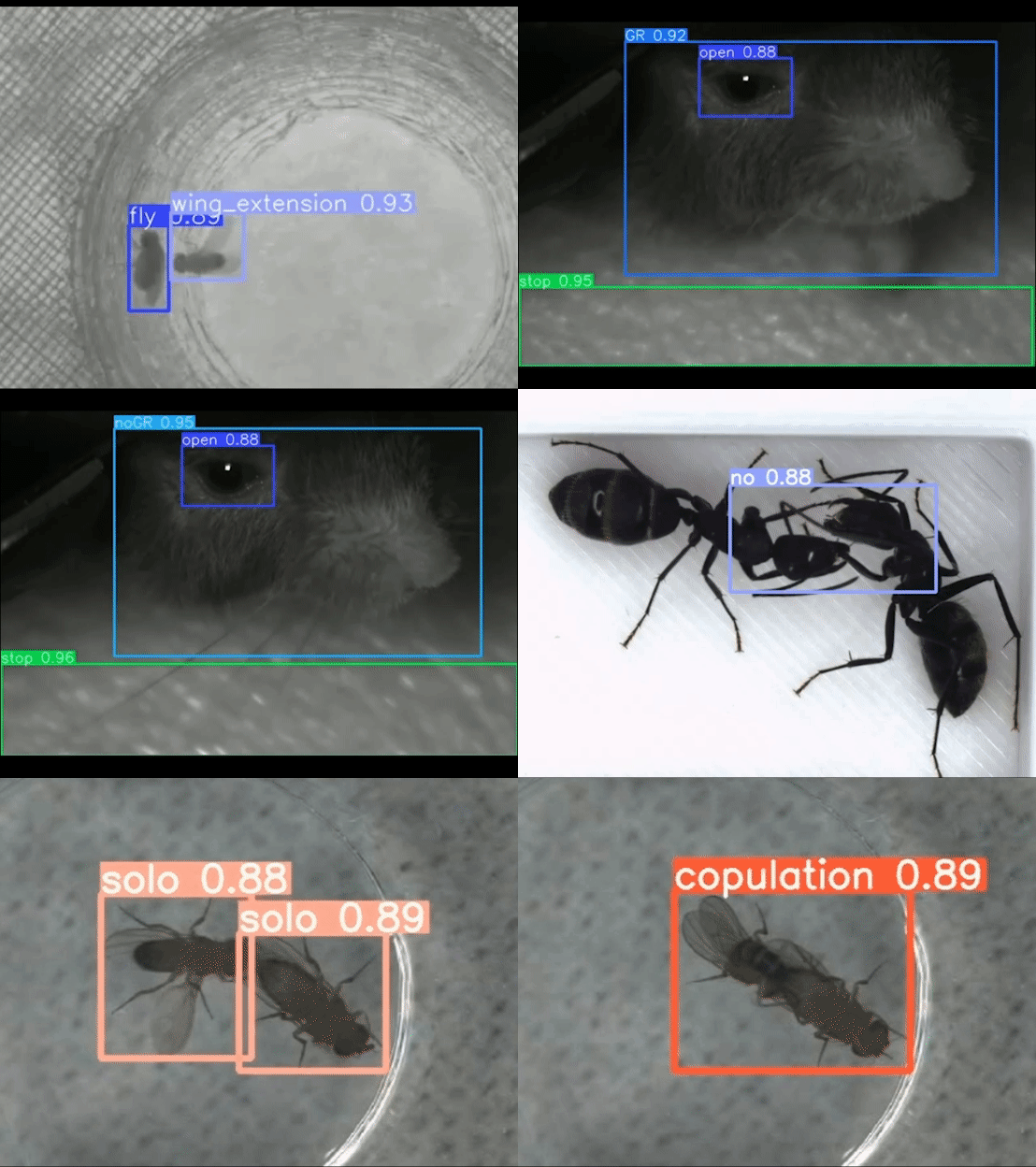
“YORU” (Your Optimal Recognition Utility) is an open-source animal behavior detection system using Python. YORU can detect animal behaviors, not only single-animal behaviors but also social behaviors. YORU also provides online/offline analysis and closed-loop manipulation.
“YORU: Animal behavior detection with object-based approach for real-time closed-loop feedback”
Support YORU. YORU is free, open-source research software. If it helps your work, please consider sponsoring its development on GitHub Sponsors.
Sponsor| Channel | Version | Notes |
|---|---|---|
| Latest Release | v1.1.2 | Stable release recommended for general use |
| Latest Beta | v2.0.0-beta.4 | Preview of the next major version — may contain bugs |
To use the beta version, check out the corresponding tag:
git checkout v2.0.0-beta.4The v2.0 betas launch without Google Chrome. Beta 4 brings YOLOv5 back, so models trained with YORU v1 load again. It also moves PyTorch to the CUDA 12.8 build for RTX 50-series GPUs, which needs NVIDIA driver 570 or newer, and corrects the Evaluation sub-module’s AP. Read the Beta Release Notes before installing or upgrading.
YORU_DEVICE or the device selector in the Training GUI.~/.yoru/logs/yoru.log.See the release page for the full list.
Comprehensive Behavior Detection: Recognizes both single-animal and social behaviors, and allows for user-defined animal appearances using deep learning techniques.
Online/Offline Analysis: Supports real-time and post-experiment data analysis.
Closed-Loop Manipulation: Enables interactive experiments with live feedback control.
User-Friendly Interface: Provides a GUI.
Customizable: Allows you to customize various hardware manipulations in closed-loop systems.
These steps install the stable release (v1.1.2). The Install guide has the details, including the prerequisites for macOS.
Before you start, install:
Install uv.
Windows (PowerShell):
winget install --id=astral-sh.uv -e
macOS / Linux:
curl -LsSf https://astral.sh/uv/install.sh | sh
Clone the repository and build the environment.
 git clone https://github.com/Kamikouchi-lab/YORU.git
 cd YORU
 uv sync
Run YORU from the repository folder.
uv run yoru
 cd "Path/to/download"
 git clone https://github.com/Kamikouchi-lab/YORU.git
Create a virtual environment with the YORU.yml file (Python 3.10):
conda env create -f "Path/to/YORU.yml"
Activate the virtual environment in the command prompt or Anaconda prompt.
conda activate yoru
Install PyTorch. The cu118 / cu121 choice has to be one that your driver supports.
pip install torch==2.4.1 torchvision==0.19.1 torchaudio==2.4.1 --index-url https://download.pytorch.org/whl/cu118
pip install torch==2.4.1 torchvision==0.19.1 torchaudio==2.4.1 --index-url https://download.pytorch.org/whl/cu121
Run YORU from the YORU project folder.
 conda activate yoru
 cd "Path/to/YORU/project/folder"
 python -m yoru
User guides — for the stable release (v1.1.2)
Beta guides — for v2.0.0-beta.4
YORU Tracker — the tracking sister application: persistent IDs, trajectories and per-animal tracks on top of YORU’s detectors (needs v2.0.0-beta.4 or later)
YORU-Explain — the explanation sister application: which parts of a frame one detection’s score depends on (occlusion sensitivity, Grad-CAM); in development, needs v2.0.0-beta.4 or later
YORU Ecosystem — how YORU, its sister applications and the trigger plugins fit together
Hayato M. Yamanouchi et al., YORU: Animal behavior detection with object-based approach for real-time closed-loop feedback. Sci. Adv. 12, eadw2109 (2026). DOI:10.1126/sciadv.adw2109
Yamanouchi, H. M., Takeuchi, R. F., Chiba, N., Hashimoto, K., Shimizu, T., Tanaka, R., & Kamikouchi, A. (2024). YORU: social behavior detection based on user-defined animal appearance using deep learning. bioRxiv (p. 2024.11.12.623320). https://doi.org/10.1101/2024.11.12.623320
AGPL-3.0 License: YORU is intended for research/academic/personal use only. See the LICENSE file for more details.
This project includes code from the following repositories: