User guide
Project: videos and models
A project is a folder that remembers your videos, your models, the detections you chose, and every analysis run.
Create or open a project
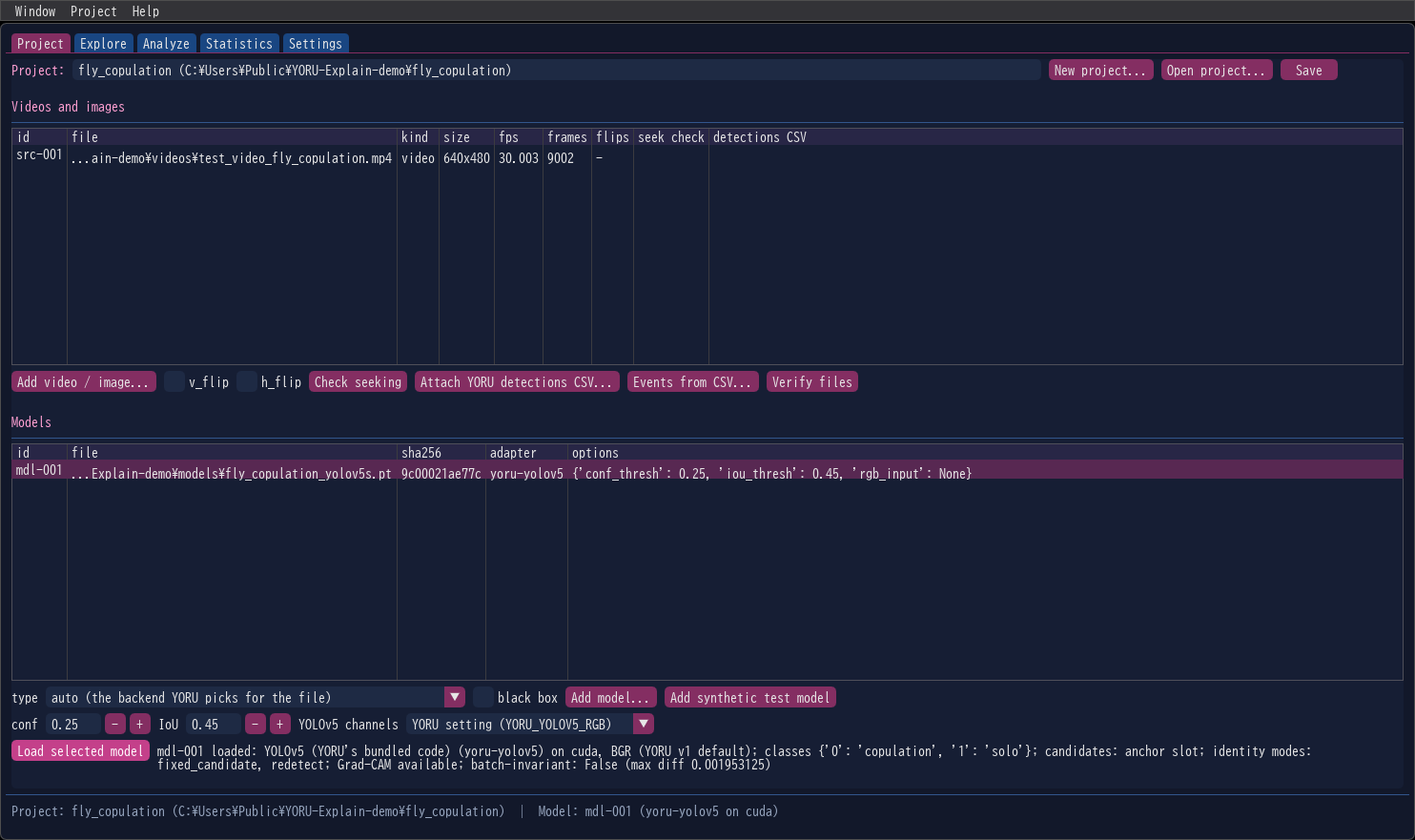
New project… asks for a folder and creates the project there; Open project… opens an existing one. Both are also in the Project menu, with Save. The status line at the bottom of the window always shows the open project and the loaded model.
A project folder holds
my_project/
├── project.json     videos, models and settings
├── events.csv       the detections chosen for explanation
└── runs/            one folder per analysis run
Videos and model weights are referenced by path and hash, never copied. If you move them, Verify files tells you which ones are missing or changed.
Add videos and images
Add video / image… adds one or more files. Before adding, tick v_flip / h_flip if YORU flipped the frames before detecting (YORU’s own flip settings); the frames are then flipped the same way here. YORU’s CSV files do not record flips, so set them as you did in YORU.
Frames are numbered as YORU’s analysis numbers them: in decoding order, from 0.
| Button | What it does |
|---|---|
| Check seeking | Compares frames reached by seeking with frames decoded in order, on 5 samples of the selected video. Some videos cannot be seeked exactly; YORU-Explain then still reads analysed frames in order and verifies every seek by presentation time, so results are not affected. |
| Attach YORU detections CSV… | Attaches a detections CSV written by YORU (or YORU-Tracker) to the selected video. Its boxes are drawn in light blue in Explore. |
| Events from CSV… | Turns the attached CSV’s detections into events in bulk, filtered by class and limited in number. Each one is found again with the loaded model before it is analysed (same class, IoU ≥ 0.9). |
| Verify files | Checks that every video and model is still where the project expects it and unchanged. |
Add a model
Choose the type, then Add model… and pick the weights file.
| type | Models |
|---|---|
auto |
The backend YORU itself would pick for the file (default) |
yolov5 |
YOLOv5 — every YORU v1 model |
ultralytics |
YOLOv8, YOLO11, YOLOv5u, YOLOv10, including OBB (rotated boxes), segmentation and pose models |
rtdetr |
RT-DETR |
torchvision |
Faster R-CNN, Mask R-CNN, SSD300 checkpoints written by YORU |
onnx |
ONNX exports of YOLOv5, YOLOv8 and YOLO11 |
The model is run with YORU’s thresholds, set here as YORU applies them: conf (default 0.25) and IoU (0.45). YOLOv5 channels chooses the colour order of YOLOv5 models: YORU setting (YORU_YOLOV5_RGB) follows YORU’s own rule, BGR (YORU v1) is what YORU v1 used, RGB forces RGB. The other backends convert to RGB themselves.
black box explains only what YORU’s detect() returns. It works for any model YORU can load, including backends YORU-Explain has no adapter for, but it can only follow a detection by re-detection and offers no Grad-CAM (Supported models).
Add synthetic test model adds a detector of red and green squares whose answers are known. It needs no weights, and it is the quickest way to see the whole workflow run.
Load the model
Select a model row and press Load selected model. Loading runs in the background; the window stays responsive. YORU-Explain then measures a few things about the model and shows them under the button:
| Shown | Meaning |
|---|---|
| adapter, device | Which adapter runs the model (yoru-yolov5, yoru-ultralytics, …) and on which device |
| classes | The model’s class names |
| candidates | What a pre-NMS candidate is for this model: an anchor slot, an anchor point, a decoder query, a region proposal, a default box, an output row |
| identity modes | How a detection can be followed on a changed frame: fixed_candidate, redetect (What is measured) |
| Grad-CAM | Whether the gradient probe passed, so that Grad-CAM is offered for this model |
| batch-invariant | Whether the scores stay exactly the same when frames are processed in batches; if not, the largest difference measured |
If the model’s family needs a warning, it appears in a popup. One example: with ultralytics 8.3.222, YORU runs YOLO26 checkpoints with NMS instead of their end-to-end head, and YORU-Explain says so.
The device is chosen on the Settings tab before loading (auto follows YORU: $YORU_DEVICE, else CUDA, else CPU).